
vpn (Virtual Private Network) has become an essential digital tool in today’s online world. Whether you use the internet for work, browsing, or communication, a VPN helps protect your privacy and keeps your data secure.
In this article, you’ll learn what a VPN is, what VPNs are used for, when you actually need one, and a clear breakdown of the top 10 best VPNs based on reliability, security, and performance. We’ll also explain the difference between free and paid VPNs, so you can make the right choice.
This guide is written in simple terms and focuses on real value for everyday users.
What Is a VPN?
A VPN is a tool that creates a secure connection between your device such as laptops, phones,tablets etc and the internet. Instead of connecting directly, your data passes through an encrypted tunnel, making it harder for third parties((hackers, your internet provider, the coffee shop Wi-Fi owner, governments, etc.) can easily read or spy on what you’re doing online.
In simple words, a VPN helps you:
(I)Protect your privacy
(ii)Secure your internet connection
(iii)Browse more safely on public networks
What Are VPNs Used For?
VPNs are commonly used for privacy, security, and safe browsing. Here are the most practical and legal use cases:
- Protecting Personal Data
VPNs encrypt your internet traffic, which helps protect sensitive information like passwords and login details.
- Using Public Wi-Fi Safely
Public Wi-Fi networks are often unsecured. A VPN adds an extra layer of protection when using Wi-Fi in cafes, airports, or hotels.
3. Improving Online PrivacyIn simple terms, it makes it much harder for certain parties to spy on your everyday internet activity. Here’s exactly how it works
Key Ways a VPN Improves Your Online Privacy
a. Hides your real IP address Websites, advertisers, and trackers see the VPN server’s IP/location instead of yours → they can’t easily link your browsing to your real home address or identity.
b. Encrypts your internet traffic Everything you do online (websites visited, searches, downloads, messages) gets scrambled in a secure tunnel → your ISP (internet provider), public Wi-Fi owners, or local hackers can’t read the contents.
c. Stops your ISP from profiling/selling your data ISPs normally track and log what you do online (often selling anonymized versions to advertisers). A VPN blinds them to the details they only see encrypted data going to a VPN server.
d. Reduces tracking & targeted ads Harder for ad networks to build a detailed profile of you across sites when your IP keeps changing and traffic is encrypted.
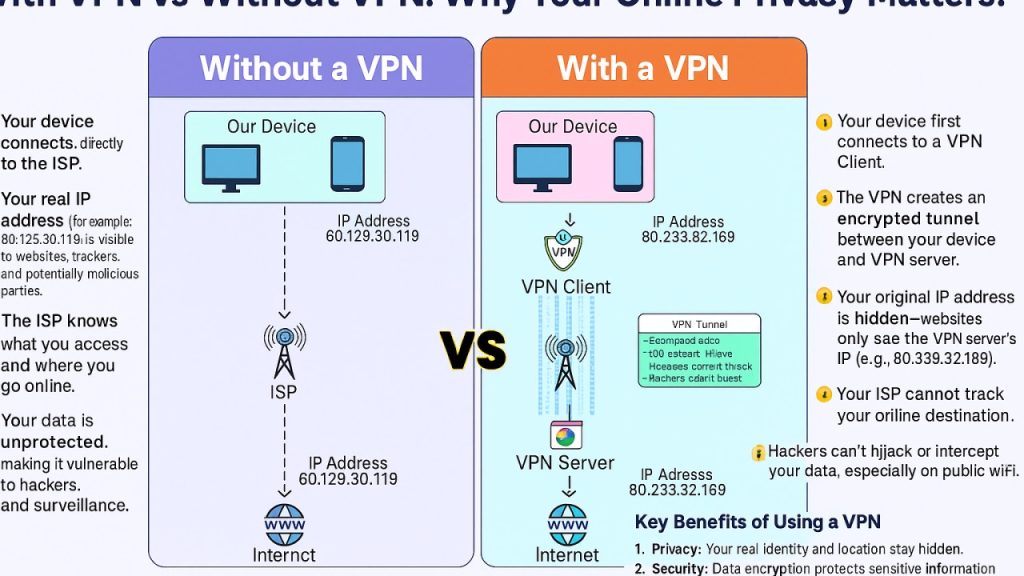
Here are some clear, simple visuals that show exactly how this privacy improvement works notice the “before” (exposed) vs “after” (protected) difference:
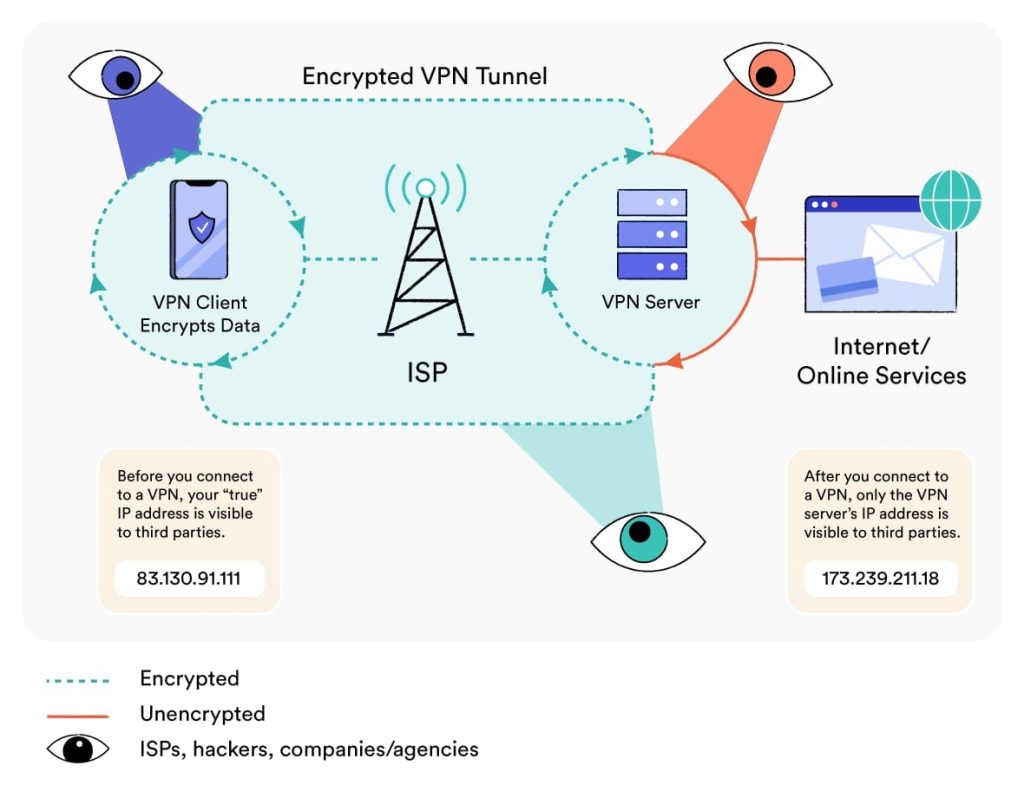
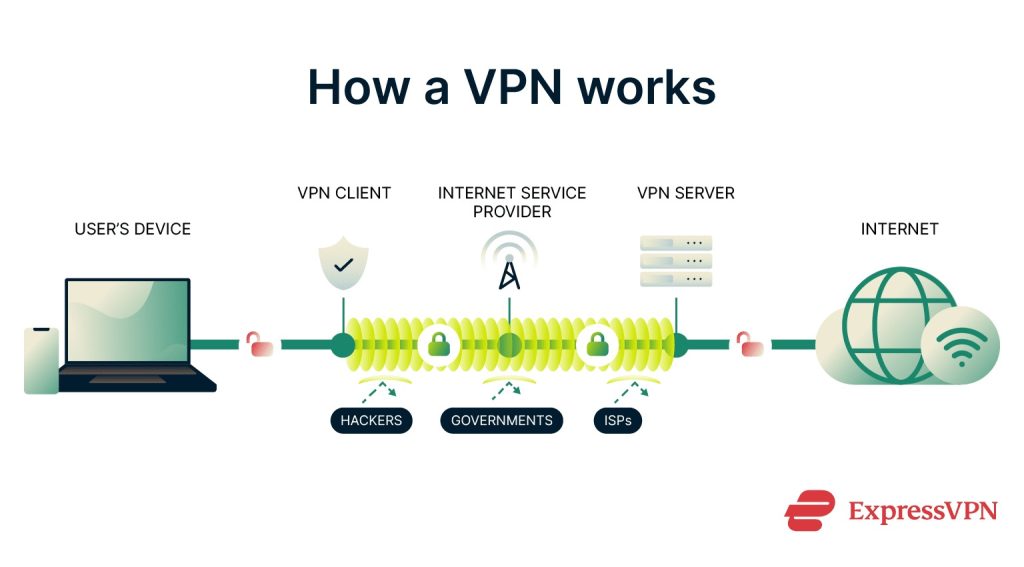
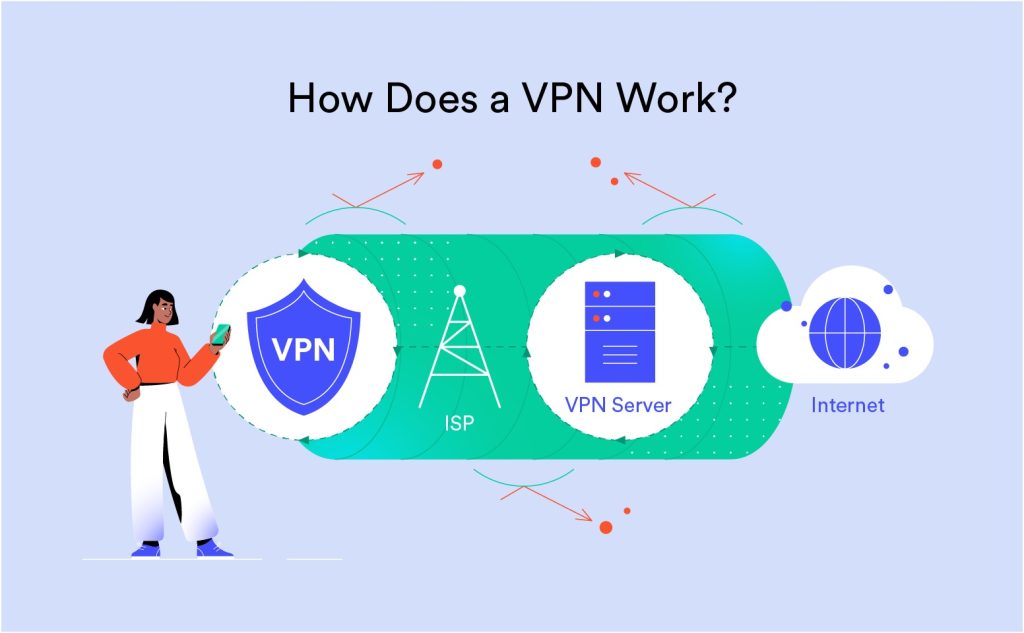
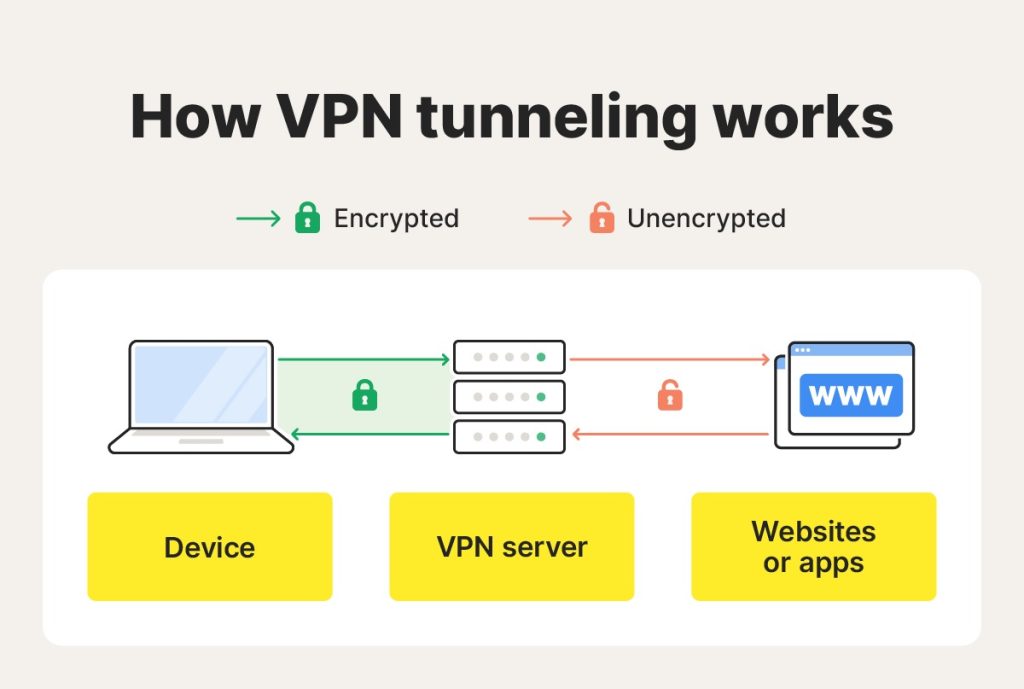
These diagrams illustrate the encrypted tunnel protecting your data from prying eyes like ISPs, hackers on public Wi-Fi, and basic trackers.
- Remote Work and Business Use
A VPN creates a secure, encrypted “tunnel” between an employee’s device (laptop, phone, tablet) and the company’s network/resources. This lets remote workers access internal files, servers, apps, databases, or intranets as if they were sitting in the office, while keeping everything protected from hackers, ISPs, or anyone snooping on the connection.
Key Use Cases for Remote Workers & Businesses
a. Secure access to company resources from anywhere Remote employees can safely connect to internal tools, shared drives, CRM systems, or proprietary software even from home, coffee shops, hotels, airports, or while traveling.
b. Protection on public/untrusted Wi-Fi Public networks (cafes, airports, co-working spaces) are prime targets for hackers. A VPN encrypts your traffic so passwords, emails, client data, or financial info can’t be stolen.
c. Data security & preventing leaks Sensitive business info (client records, contracts, financials) stays encrypted end-to-end. This reduces the risk of breaches and helps meet compliance rules like GDPR, HIPAA, or industry standards.
d. Bypassing geo-restrictions or improving access Some company tools or cloud services work better (or only) from certain locations. A VPN can route you through a server in the right country without exposing your real location.
e. Centralized control for ITteams Businesses use business-grade VPNs (also called remote access VPNs) to manage who connects, enforce policies, monitor (if needed), and scale for teams of any size.
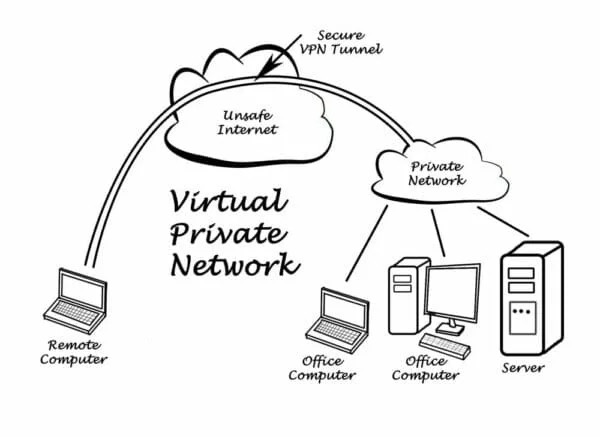
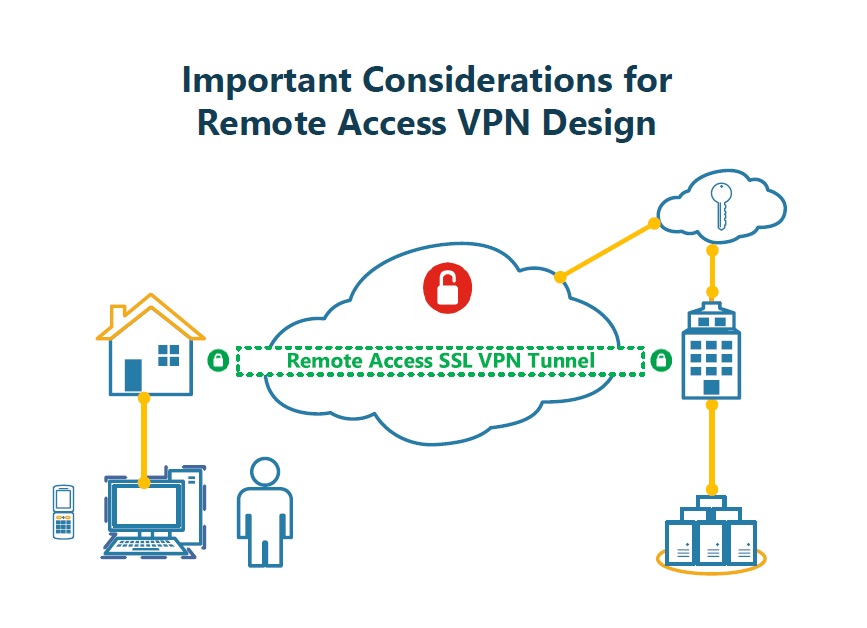
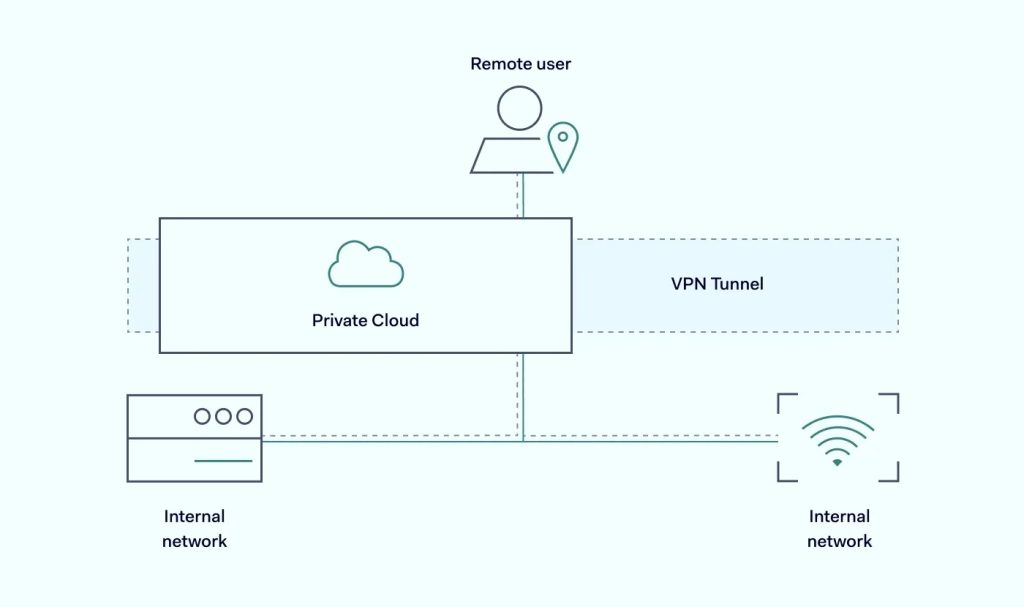
These visuals show the classic setup: Employee → Encrypted VPN tunnel → Company network/server → Safe access to resources, with protection from external threats along the way.
5 Avoiding Unsecured Network
This one of the most important reasons why people use a VPN is exactly to stay safe on unsecured (or public/open) networks.
These are Wi-Fi hotspots you find
everywhere: coffee shops, airports, hotels, train stations, malls, libraries, etc. Most of them are unsecured (no password or very weak security), which makes them super convenient… but also dangerous for your data.
Why Unsecured Networks Are Risky Without a VPN
On a normal public Wi-Fi:
- Your data travels “in plain sight” (unencrypted or only partially encrypted).
- Hackers on the same network (or nearby) can easily spy, intercept, or steal things like:
- Passwords & login details
- Emails & messages
- Credit card info when shopping/banking
- Personal photos/files you’re uploading
Common attacks include:
- Man-in-the-Middle (MITM): Hacker secretly sits between you and the internet, reading/modifying your traffic.
- Evil Twin: Fake hotspot with a similar name (e.g., “Airport_Free_WiFi” instead of the real one) that tricks you into connecting.
- Packet sniffing: Just listening in on unencrypted data.
Here are some clear before vs after diagrams showing what happens without a VPN (exposed & vulnerable) vs with a VPN (protected):
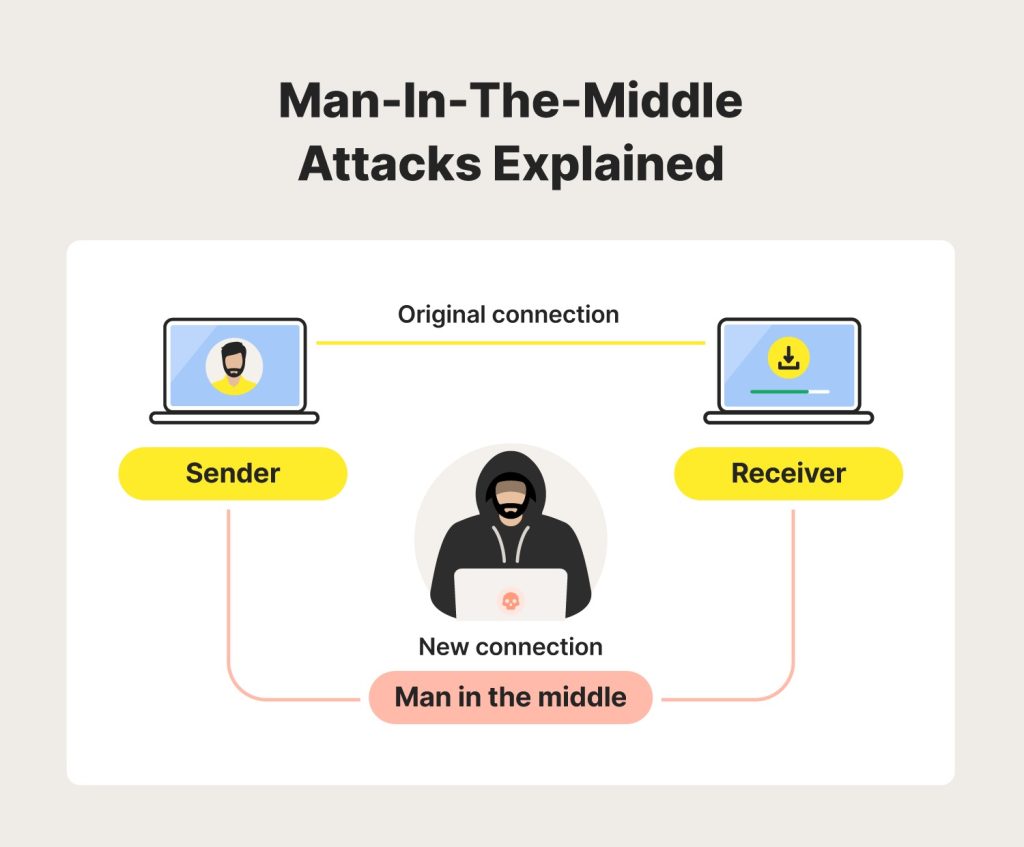
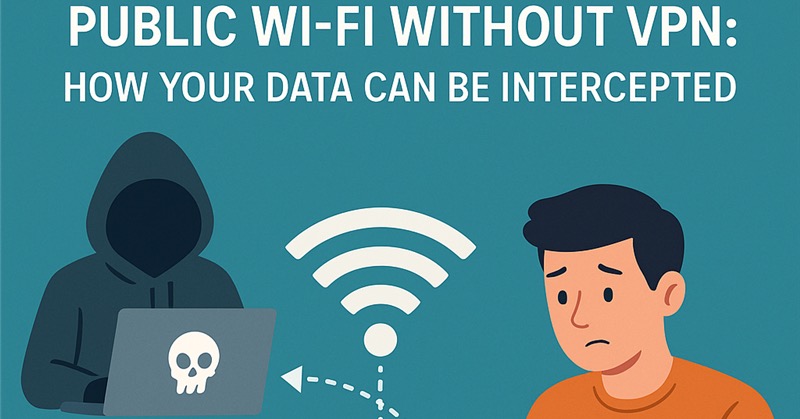
These show hackers intercepting your data on public Wi-Fi when there’s no VPN everything is visible!
Free VPNs vs Paid VPNs (What You Should Know)
Before choosing a VPN, it’s important to understand the difference.
Free VPNs
Advantage
•No payment required
•Useful for light browsing
•Easy to start with
Disadvantage
•Limited speed and data
•Fewer server locations
•Ads may appear
•Weaker privacy policies
Free VPNs are best for basic, short-term use.
Paid VPNs
Advantage
•Strong encryption
•Faster speeds
•More servers worldwide
•Better privacy and support
•No ads
Disadvantage
•Requires subscription
Paid VPNs are better for consistent, secure, and long-term use.
Top 10 Best VPNs (Reliable & Popular)
Below are some of the most trusted VPN services available today. These are listed based on security, ease of use, performance, and reputation.
- NordVPN
Secure, fast, and trusted by millions worldwide.
Why it stands out:
Strong security features and excellent performance.
Best for:
Privacy-focused users and professionals.
- ExpressVPN
Fast, reliable, and easy to use.

Why it stands out:
High-speed connections and simple interface.
Best for:
Beginners who want premium performance.
- Surfshark
Budget-friendly with premium features.

Why it stands out:
Affordable pricing with unlimited device connections.
Best for:
Families and multi-device users.
- CyberGhost
Simple setup with strong privacy tools.

Why it stands out:
User-friendly design and large server network.
Best for:
New VPN users.
- Proton VPN
Privacy-first VPN built by security experts.

Why it stands out:
Strong privacy focus and transparent policies.
Best for:
Users who value data protection.
- Private Internet Access (PIA)
Powerful settings for advanced users.
Why it stands out:
Advanced customization options.
Best for:
Tech-savvy users.
- TunnelBear
Easy, fun, and beginner-friendly.

Why it stands out:
Friendly design and simple controls.
Best for:
Casual users and beginners.
- Windscribe
Flexible VPN with free and paid plans.

Why it stands out:
Decent free plan with flexible options.
Best for:
Light users testing VPN services.
- IPVanish
Secure connections with solid speeds.
Why it stands out:
Strong performance and good security.
Best for:
Everyday browsing and remote work.
- Hotspot Shield
Speed-focused VPN for daily use.
Why it stands out:
Fast speeds and easy setup.
Best for:
Users who want quick protection.
How to Choose the Right VPN for You
Before choosing a VPN, ask yourself:
•Do I need basic or advanced
security?
•Will I use it daily or occasionally?
•Do I prefer free or paid services?
•How many devices will I connect
Answering these questions helps you avoid paying for features you don’t need.
Common VPN Mistakes to Avoid
•Using unknown or untrusted VPN providers
•Ignoring privacy policies
•Expecting free VPNs to match paid performance
•Leaving VPN apps outdated
Avoiding these mistakes ensures a safer experience.
VPNs are valuable tools for improving online privacy and security. While free VPNs can be useful for light tasks, paid VPNs offer stronger protection, better performance, and more reliability.
Choosing the right VPN depends on your needs, usage habits, and budget. With responsible use, a VPN can be a smart addition to your digital life.